Showing posts with label hardware. Show all posts

Saturday, August 23, 2008

How to fix gaming mouse problem in Vista 32/64

I have seen many people saying that  Vista is not suitable for gaming purposes. It is not really true. I have been using vista from  March 2007 and all of my games worked perfectly in it. Vista surely have lots of compatibility issues but most of the problems can be fixed. One of the most serious issues the vista gamers facing is gaming mouse incompatibility. Updating drivers  or firmwire won't help in any case. Serveral top brand gaming mouses such as Razer Lachesis, Razer DeathAdder, Logitech G5, Logitech G9, Microsoft Sidewinder, Microsoft Habu, Cyber Snipa, Steelseries Ikari, etc have similar kind of problems such as macros not working or side button not working in games.

This problem is caused by UAC(User Access Control) component in Vista. UAC is a security component in vista which limit application software to standard user privileges until an administrator authorizes an increase in privilege level. It help to prevent malware programs from gaining system access. Not only malware but all the applications and drivers are affected by this. This is the reason for gaming mouse problem. It can be fixed by disabling UAC as I've explained below.

How to disable UAC?
1. First click on start button and type "msconfig" and press enter. UAC will ask for permission, click on continue.


2. Select Tools tab. In that, select "Disable UAC" and click on Launch button.


3. Finally restart vista to make it work.

Note: If you want to re-enable UAC then do the similar steps and use "Enable UAC" instead of "Disable UAC".

The pointer for a gaming mouse does not move correctly in Windows Vista
This is another commonly seen issue in vista.
You may experience the following problems in Windows Vista when you use a high performance gaming mouse, and you enable the Enhanced Pointer Precision option:
• The pointer does not move correctly when you move the mouse down and to the right side.
• The pointer moves by itself.
• The pointer movement is irregular.

Download fix for pointer problem here:
Windows6.0_KB932653_x86.msu (32-bit)
Windows6.0_KB932653_x64.msu (64-bit)

Monday, August 11, 2008

Intel names new chip Core i7

Intel Corp said it plans to sell its new generation of chips for desktop computers under the established Core brand, with the first chips of the new line to be called Core i7.
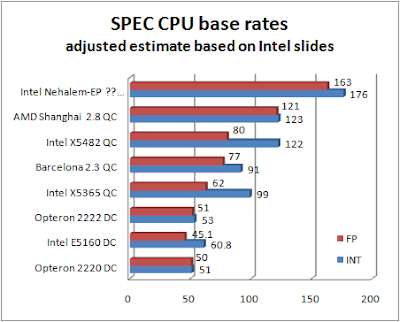
The microprocessors are based on a design the company has code-named Nehalem and are expected to be in production the last three months of this year. Intel says the new design will deliver both high performance and energy efficiency.


Sporting anywhere between two and eight processors cores, the first chips will integrate a memory controller and come with Intel's QuickPath Interconnect (QPI) which is expected to provides a faster route for the CPU to communicate with system components such as a graphics card.


Some new technologies in Core i7
  • Dynamic scalability, managed cores, threads, cache, interfaces, and power for energy-efficient performance on demand.
  • Design and performance scalability for server, workstation, PC, and mobile demands with support for 2-8+ cores and up to 16+ threads with simultaneous multi-threading (SMT), and scalable cache sizes, system interconnects, and integrated memory controllers.
  • Simultaneous multi-threading brings high-performance applications into mainstream computing with 1-16+ threads optimized for a new generation multi-core processor architecture.
  • Scalable shared memory of Intel QuickPath technology features memory distributed to each processor with integrated memory controllers and high-speed point-to-point interconnects to unleash the performance of next-generation Intel® multi-core processors.
  • Multi-level shared cache improves performance and efficiency by reducing latency to frequently used data.
Intel is expected to add other identifiers to the Core i7 name as it launches products in the range. It is also expected to identify its high-end "Extreme Edition" parts with a black logo. Intel's Core i7 will be available in market by Q4 2008. Intel is also expected to release its laptop range of processors, based on the Nehalem, in the second half of 2009.

Tuesday, August 5, 2008

Samsung to ship ultra fast 256GB SSD Drive


Samsung plans to launch a flash memory based solid state disk(SSD) drive this year that has a 256GB capacity and a high speed SATA II interface. The drive's dimension match those of a standard 2.5 inch hard disk drive; it's designed to be a drop-in replacement for a laptop hard drive.

Solid state disk drives use a flash memory chips in place of spinning magnetic disks that hard disk drives use. The chips make the drives sturdier and faster but the per gigabyte cost is much higher too.

Samsung's is the second recently announced 256GB SSD drive. The other from US based Super Talent, is thicker than Samsung's, at 12.5 millimeters compared to Samsung's 9.5millimeters. That drive has a SATA I interface with read speed of 65mbps(megabits per second) and write speed of 50mbps. Samsung's SSD drive has a read speed of 200mbps and a sequential write speed of 160mbps.


Rather than use costly single-level cell (SLC) technology, the company has managed to develop a multi-level cell (MLC) storage drive that transfers as quickly as the best SLC storage while costing much less to produce than past SSDs. Improvements to the storage controller have also extended the longevity to as long as SLC drives, giving the 256GB drive longevity as good or better than some rotating hard disks. Power consumption is also exceptionally low at 0.9 watts in active mode.

In addition, the drive offers a sophisticated data encryption process that prevents data stored on the SSD from being accessed in an unauthorized manner, even after the SSD is removed from the PC.

Once introduced, the Samsung's 256GB SSD will mark the largest capacity SSD from the global market leader in SSD sales, effectively eliminating density as a barrier to SSD adoption in the consumer space. Samsung expects its new drive to be sampling for computer manufacturers by September and shipping to those clients by the end of the year; this applies to both a 2.5-inch drive for more traditional notebooks and a 1.8-inch drive for ultraportables and other much smaller devices. Costs haven't yet been announced.

Saturday, July 12, 2008

Hitachi introduces second generation 1TB Drive

Hitachi was first to announce 1TB hard drive in January 2007. Now they announced second generation 1TB drive Deskstar 7K1000.B which used 43% less power than first generation. The 7K1000.B also offers users the option of bulk data encryption (BDE) for the entire contents of the drive.

Instead of five 200 GB disks, the new drive has three 333 GB disks. Hitachi representatives told us that the 5-disk model will continue to be available through 2009, but the 3-disk version will ramp quickly and replace the old drives. What makes the new 7200 rpm drive interesting is not its performance or capacity, but its power consumption.
The 7K1000.B makes use of perpendicular magnetic recording and the drive’s BDE option uses AES encryption certified by the National Institute of Standards and Technology to deliver the strongest commercially available levels of security for data.

Power requirement for the 7K1000.B is 5.2W at idle and the drive uses a 16MB cache. And if power consumption is the primary concern of the user (such as data storage facilities), the drive supports a “reduced power idle state”: The disk rotation speed can be dropped via HDD commands to less than 5000 rpm, which will take the idle power consumption down to 2.4 watts That is close to 2.5” territory (about 2 – 2.2 watts) and could make these drives an interesting option for any environment that does not depend on maximum data transfer rates. The drive has a maximum media transfer rate of 1388 Mbits/s. For enterprise users needing a high mean time between failure (MTBF), a DeskstarE7K1000 drive is also being introduced that has up to a 32MB buffer and a 1.2 million hour MTBF featuring the same low power requirements and optional encryption technology.

Friday, July 11, 2008

AMD Radeon HD 4870 Delivers First TeraFLOPS Graphics Chip


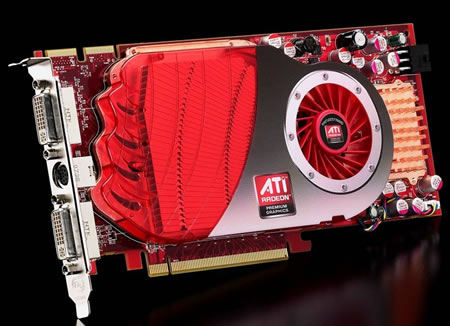
AMD launched the first teraFLOPS graphics card, the ATI Radeon HD 4850, and the first graphics card featuring ultra high bandwidth GDDR5 memory, the ATI Radeon HD 4870. ATI Radeon™ HD 4800 Series GPUs bring the power of graphics ‘supercomputing’ to gamers, setting a new standard for visual computing. Redefine the way you play and take HD gaming to the extreme with best-in-class performance. With one teraFLOPS on tap, the TeraScale graphics engine delivers an immersive, cinematic gaming experience. Add this graphics card to your PC and watch Blu-ray movies and play HD content with incredible visual fidelity or take your experience to another level with new multimedia capabilities.

"The ATI Radeon 4800 series represents a 2X performance jump over the ATI Radeon HD 3800 GPU, the biggest generational increase since the game-changing launch of the Radeon 9700 in 2002," said Rick Bergman, senior vice president and general manager, Graphics Products Group, AMD. "AMD made a strategic decision to focus on GPU designs that maximized our efficiency and allowed us to provide enthusiasts, performance and mainstream users with the most compelling value proposition at every price point. The ATI Radeon 4800 series sets a new industry standard in key metrics such as performance-per-watt, performance-per-mm2 of chip die size, and performance-per-dollar."


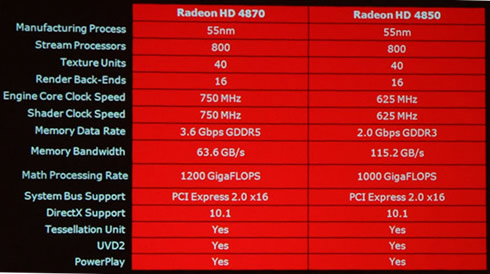
The ATI Radeon HD 4870, available with a suggested retail price of USD$299, represents an unprecedented 1.2 teraFLOPS of visual compute power. It features a stock GPU core clock speed of 750 MHz, 512 MB of GDDR5 memory rated at 3.6 gigabits/second, and comes in a dual-slot PCI Express 2.0 configuration with a maximum board power of 160 watts.


The ATI Radeon HD 4850 immediately available with a retail price of USD$199, received an enthusiastic welcome from global graphics reviewers. The ATI Radeon HD 4850 is the first teraFLOPS graphics chip, with 800 stream processing cores (identical to the ATI Radeon HD 4870), a stock GPU core clock speed of 625 MHz, 512 MB of GDDR3 memory rated at 2 gigabits/second, and comes in a single-slot PCI Express 2.0 configuration with a maximum board power of 110 watts.

Building versions of the ATI Radeon HD 4800 series are VisionTek, ASUS, PowerColor, MSI, GIGABYTE, GECUBE, Force3D, SAPPHIRE Technology, Diamond Multimedia, Club 3D, HIS (Hightech Information Systems) and Palit Multimedia.


The ATI Radeon HD 4800 series will allow users to experience HD digital content while it can also help improve the definition and image quality of any visual media including standard DVDs and videos. The new series also includes new HD media capabilities, like picture-in-picture HD viewing, fast format conversion of your favorite media, and support for the latest HD audio technologies like 7.1 surround sound.

ATI PowerPlay technology intelligently adjusts requirements to ensure performance is there when you need it most while throttling back for lesser user demands.

With the ATI Radeon HD 3870, AMD set a new performance per watt standard, which has been broken by the ATI Radeon HD 4800 series. Compared to the ATI Radeon HD 3870 series GPU, the ATI Radeon HD 4800 series delivers twice the performance while drawing only 20 percent more power.

Below you can see a comparison between AMD's HD 3800 and the new HD 4800 series of graphics cards:

ATI radeon HD 3800 ATI radeon HD 4800 Difference
Process
55nm
55nm
no
Die size
190 mm2
256 mm2
1.35x
Transistors
666M
956M
1.4x
4x AA Fillrate
8
16
2x
Z/Stencil
32
64
2x
Texture
16
40
2.5x
Shader
320
800
2.5x
Bandwidth
72 GB/sec
115.2 GB/sec
1.6x

ATI Radeon HD 4800 Series – Key Features
  • TeraScale Graphics Engine - The new TeraScale graphics engine features over one teraFLOPS, nearly one billion transistors and 800 stream processors so you can enjoy the high resolutions and fast frame rates previously only available with dual-card systems.
  • Advanced Memory - GDDR5 memory provides twice the bandwidth per pin of GDDR3.
  • Enhanced Anti-Aliasing & Anisotropic Filtering - High performance anisotropic filtering and 24x custom filter anti-aliasing (CFAA) smooth jagged edges and create true-to-life graphics, for everything from grass to facial features.
  • DirectX® 10.1 - Play today while preparing for tomorrow with state-of-the-art DirectX 10.1 graphics capabilities.
  • ATI CrossFireX™ Technology - ATI CrossFireX™ technology with up to quad GPU support offers superior scalability so your system is ready to level up when you are.
  • PCI Express 2.0 - Support for PCI Express 2.0 will prepare you for bandwidth-hungry games and 3D applications.
  • Unified Video Decoder 2 (UVD 2) - UVD 2 frees up your CPU for other tasks so you get The Ultimate Visual Experience™ for even the most processing-intensive content, including VC-1, H.264 and now MPEG-2. Also, take full advantage of Blu-ray functionality with dual-stream, picture in picture (PIP) capabilities.
  • Accelerated Video Transcoding (AVT) - AVT allows you to convert videos to H.264 and MPEG-2 formats up to 19x faster than when using a just CPU.3 Full 1080p files can be converted to H.264 and MPEG-2 up to 1.8x faster than real-time.
  • Upscale Beyond 1080p - Watch the hottest Blu-ray movies or other HD content at full 1080p display resolution and beyond.
  • Enhanced DVD Upscaling - Watch standard DVD movies in near high-definition quality with DVD upscaling. The GPU uses post processing algorithms to enhance standard and low resolution videos and movies on your HD display.
  • Dynamic Contrast - Dynamic Contrast automatically adjusts the contrast and brightness during scenes to consistently deliver a crisp, vibrant picture.
  • HDMI - Enjoy the latest audio technologies using HDMI with 7.1 digital surround sound support. Also, xvYCC support allows the user to enjoy a wider range of color when connected to a capable HDTV.
  • Dynamic Power Management - ATI Radeon HD 4800 Series graphics cards deliver high performance when needed and conserve power when the demand on the graphics processor is low.
  • More Performance Per Watt - ATI Radeon HD 4800 series delivers up to 2x the performance per watt of AMD’s previous generation GPUs.
Source:cdrinfo

Thursday, July 3, 2008

Graphics card performance chart


Similar performance graphics cards grouped in to tiers. Top tier contain highest performance graphics card and performance decreases as going down tiers. It also include laptop and integrated chipsets from geforce and radeon.

You can use this hierarchy to compare the pricing between two cards, to see which one is a better deal and also to determine if an upgrade is worthwhile. Don't upgrade your graphics card unless the replacement card is three tiers higher.

GRAPHICS CARD HIERARCHY CHART
GeForce
Radeon
9800 GX2
8800 GTX, 8800 Ultra, 9800 GTX 3870 X2
8800 GT 512MB, 8800 GTS 512MB
8800 GTS 640 MB, 9600 GT HD 2900 XT, 3870
8800 GS, 9600 GSO 3850 512MB
8800 GT 256MB, 8800 GTS 320MB HD 2900 PRO, 3850 256MB
7950 GX2 X1950 XTX
7800 GTX 512, 7900 GTO, 7900 GTX X1900 XT, X1950 XT, X1900 XTX
7800 GTX, 7900 GT, 7950 GT X1800 XT, X1900 AIW, X1900 GT, X1950 PRO, HD 2900 GT
7800 GT, 7900 GS, Go 7950 GTX, 8600 GTS X1800 XL, X1950 GT, Mobility X1800 XT
6800 Ultra, 7600 GT, 7800 GS, Go 7800 GTX, Go 7900 GTX, 8600 GT X800 XT (& PE), X850 XT (& PE), X1650 XT, X1800 GTO, Mobility X1900, HD 2600 XT, 3650 (DDR3), 3670
6800 GT, 6800 GS (PCIe), Go 7800, Go 7900 GS, 8700M GT X800 XL, X800 GTO2/GTO16, Mobility X800 XT, HD 2600 PRO, Mobility HD 2600 XT, 3650 (DDR2)
6800 GS (AGP), Go 6800 Ultra, Go 7600 GT, 8600M GT X800 GTO 256mb, X800 PRO, X850 PRO, X1650 GT, Mobility HD 2600
6800, Go 6800, 7300 GT GDDR3, 7600 GS, Go 7700, 8600M GS X800, X800 GTO 128mb, X1600 XT, X1650 PRO, Mobility X1800
6600 GT, 6800LE, 6800 XT, 7300 GT DDR2, Go 7600 (128 bit), 8500 GT 9800 XT, X700 PRO, X800 GT, X800 SE, Mobility X800, X1300 XT, X1600 PRO, HD 2400 XT
FX 5900, FX 5900 Ultra, FX 5950 Ultra, 6600 (128 bit), Go 6800 (128 bit) 9700, 9700 PRO, 9800, 9800 PRO, X700, X1300 PRO, Mobility X1450, X1550, Mobility X1600, Mobility X1700, HD 2400 PRO, Mobility HD 2400 XT, Mobility X2500, HD 3200
FX 5800 Ultra, FX 5900 XT, Go 6600, Go 7600 (64 bit), Go 8600M GS 9500 PRO, 9600 XT, Mobility 9800, 9800 PRO (128 bit), X600 XT, Mobility X700, X1050 (128 bit), Mobility X1350, Mobility X1400, Mobility X2300, Mobility HD 2400
4 Ti 4600, 4 Ti 4800, FX 5700 Ultra, 6200, 8400 GS 9600 PRO, Mobility 9700 (128 bit), 9800 LE, X600 PRO, Mobility X600, Mobility X1300, Xpress 1250, Mobility HD 2300
4 Ti4200, 4 Ti4400, 4 Ti4800 SE, FX 5600 Ultra, FX 5700, 6600 (64 bit), 7300 GS, 8400M GS 9500, 9550, 9600, Mobility 9600, X300, X1050 (64 bit)
3 Ti500, FX 5200 Ultra, FX 5600, FX 5700 LE, Go 5700, 6200 TC, 6600 LE, 7200 GS, 7300 LE 8500, 9100, 9000 PRO, 9600 LE, Mobility 9700 (64 bit), X300 SE, X1150
3, 3 Ti200, FX 5200 (128 bit), FX 5500, Go 5600, Go 6200, Go 6400, Go 7200, Go 7300, Go 7400 (64 bit) 9000, 9200, 9250, Mobility 9600 (64 bit), Mobility X300
FX 5200 (64 bit), 6100, 6150, Go 7200, Go 7400 (32 bit) 9200 SE, Xpress 200M, Xpress 1000, Xpress 1150
2 GTS, 4 MX 440, 2 Ultra, 2 Ti, 2 Ti 200 7500
256, 2 MX 200, 4 MX 420, 2 MX 400 SDR, LE, DDR, 7000, 7200
Nvidia TNT ATI Rage 128

Wednesday, July 2, 2008

GeForce buyers guide


Most of the PC users even gamers doesn't have much knowledge about graphics cards. We have seen people buying graphics cards by looking at their price or picture above the package box. It is all wrong. Graphics card itself is like a small computer having motherboard, processor and memory. Main things we can note about graphics card are chipset, manufacturer and memory.

Judging a card's performance by memory is also wrong.. For eg: Geforce 6100LE with 512MB RAM will be like using 1GB RAM on Pentium 300Mhz CPU.
Before you buy a graphics card, you should do a detailed study about that card. Search in Google for comparison and benchmark with other cards of that range is a must.


Introduction to GeForce

GeForce is a brand of PC graphics chipsets designed by Nvidia. Top two brands in graphics card are Nvidia GeForce & ATI Radeon(current owned by AMD).
Budget wise Radeon cards are cheaper than Geforce considering similar performance. But in reliability and quality GeForce is better than Radeon.


Generations of GeForce
Every year Nvidia release new generations of GeForce cards with better performance and advanced technologies.
  • GeForce 256 (1991)
  • GeForce2 (2000)
  • GeForce3 (2001)
  • GeForce4 (2002)
  • GeForce FX (2003)
  • GeForce 6 (2004)
  • GeForce 7 (2005 - 2006)
  • GeForce 8 (2007) *
  • GeForce 9 (2008) *
* series support DirectX 10

Chipset Number

Every GeForce chipset have a number. for eg: 8600. First digit i.e. 8 is the series/generation and the rest digits are models of that series (bigger number will have higher performance and price.. see Product Naming Scheme)

If we look at GeForce 7 series chipsets. There are several models like 7100, 7200, 7300, 7600, 7800, 7900, 7950..
  • 7100 is the cheapest and lowest in performance. Normally used in inbuilt motherboard graphics and all. Can run games only at low resolution and details.
  • 7200, 7300 is for gamers who cannot afford much. They can run games at low resolution and medium details.
  • 7600 for budget gamers. They can run games at medium resolution and medium/high details.
  • 7800 is for high end gamers. They can run games at high resolution and high details.
  • 7900, 7950 are for hardcore gamers who want best. They can run games at max resolution and details.
* Note that the all cards will age. Growth of graphics & gaming industry is in exponential rate. Newer games will have more requirements. So we will need to buy new cards every years or 2..

New series cards are more powerful than older series and have lots of supports for current and future games..
For eg: benchmarks proves that GeForce 9400 card = GeForce 8600 = GeForce 7800 in performance..

Product Naming Scheme (source: wikipedia)
This scheme is only applicable to the GeForce FX and above series video cards, however GeForce4 and earlier cards follow a similar pattern.

* Shader amount compares the number of shaders pipelines or units in that particular model range to the highest model possible in the generation.

Card Suffixes
There are suffixes like LE, GS, GT, GTS and GTX/Ultra besides these numbers which are performance factor.
  • GTX/Ultra is for mad gamers who can spend lots of money for gaming equipments.. This monster is designed to run future games(after a year) in max quality.
  • GTS is for for hardcore gamers.. This one is designed to run current and upcoming games in max quality.
  • GS, GT are for normal gamers who cant afford too mch high pricy cards.. This can run current games in max/high quality.. Best choice if u upgrade ur pc regulary. GT is faster than GS.
  • LE is stripped down version. It is cheapest and weakest..
Gaming Performance vs. Integrated Graphics
Just an example to show the performance difference between some of latest cards. This give more idea about performance variation by chipsets. (Source: nvida website)
GeForce 9800 - 22x
GeForce 8800 - 18x
GeForce 9600 - 15x
GeForce 7900 - 14x
GeForce 8600 - 13x
GeForce 8500 - 5x
GeForce 8400 - 3.8x

Memory
Don't be fooled into thinking the more the memory more performance. Benchmarks proves that high memory doesn't benefit anything in gaming performance unless u run games at very high resolution.

Memory bandwidth is more important than the amount of memory on the card. 3D performance is defined by the speed at which information can get to the GPU , and the memory bandwidth determines just how quickly the graphics processor can get data to and from the memory built onto the graphics card. The greater the bandwidth, the better. There are several memory types like GDDR, GDDR2, GDDR3, GDDR4,etc. Current generation cards uses GDD3 memory. In future it will be GDDR4.